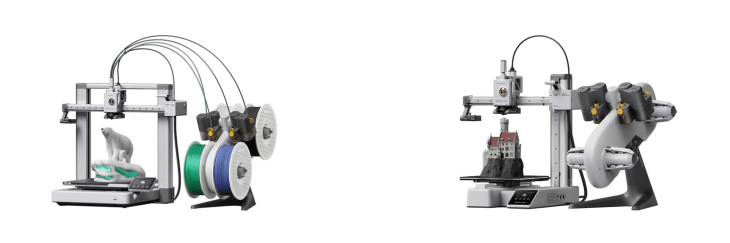
Bambu Lab A1 & Bambu A1 Mini share many similarities, but there are also important differences, such as quality, performance, features, design, and connectivity. If you want the best one between them, I Would recommend the Bambu Lab A1 rather than the Bambu A1 Mini.
Why Do I Recommend The Bambu Lab A1?
- The Bambu A1 features a 256 × 256 × 256 mm build volume to print larger and more complex models without splitting them into parts, whereas the Bambu A1 Mini has a smaller 180 × 180 × 180 mm build area.
- Bambu A1 comes with a dual-Z-axis gantry for enhanced stability during tall or fast prints, while the Bambu A1 Mini uses a single-Z-axis cantilever structure that is less rigid for large builds.
- It supports a maximum 100 °C bed temperature to improve adhesion for materials like ABS and PETG, while the Bambu A1 Mini is limited to about 80 °C.
- The Bambu A1 features a larger color touchscreen for easier on-device navigation and setting adjustments, whereas the Bambu A1 Mini includes a smaller display that shows fewer controls per screen.
- Bambu A1 has a higher-rated power supply to maintain consistent heating and motion performance during long prints, while the Bambu A1 Mini uses a lower-wattage system.
- It includes a top-mount configuration for the AMS Lite to keep the setup compact and cable routing efficient, whereas the Bambu A1 Mini requires a separate stand or side placement.
- The Bambu A1 features a wider range of compatible build plates and third-party accessories for material flexibility and maintenance options, while the Bambu A1 Mini supports a smaller selection due to its compact format.
- Bambu A1 has a more robust frame and larger base for improved vibration resistance and consistent print surfaces, while the Bambu A1 Mini’s lightweight chassis can introduce minor flex.
Maybe the Bambu A1 Mini can make you comfortable because it’s a little bit cheaper than the Bambu Lab A1. But you have to compromise all the above-mentioned features. Now the Decision is Yours. I hope it was helpful to choose the right one.
Side By Side Comparison
| Feature | Bambu Lab A1 | Bambu A1 Mini |
| Build volume (mm) | 256 × 256 × 256 | 180 × 180 × 180 |
| Build volume (liters) | ~16.8 L | ~5.8 L |
| Max bed temperature | ~100 °C | ~80 °C |
| Z-axis design | Dual Z uprights | Single Z upright |
| Gantry type | Full gantry | Cantilevered X-beam |
| Chassis size class | Large desktop | Compact desktop |
| Weight class | Heavier | Lighter |
| Touchscreen size | Larger color display | Smaller color display |
| AMS Lite mounting | Top-mount supported | External/side stand usage |
| Build plate size class | 256 mm class plates | 180 mm class plates |
| Accessory ecosystem | Wider plate/accessory options | Fewer dedicated options |
| Rated power class | Higher wattage | Lower wattage |
| Desk footprint | Larger footprint | Smaller footprint |
| Max part size (X) | 256 mm | 180 mm |
| Max part size (Y) | 256 mm | 180 mm |
| Max part size (Z) | 256 mm | 180 mm |
| Price | Check Bambu A1 Price | Check A1 Mini Price |
What Common Both Can Do?
- Printing Technology: Both the Bambu A1 and A1 Mini use FDM technology, meaning they extrude melted filament layer by layer to build 3D objects. This provides reliable performance with a wide range of materials.
- Nozzle Diameter: Each printer uses a standard 0.4 mm nozzle, which balances print speed and detail resolution. It’s the most common size for everyday and precision prints alike.
- Nozzle Type: Both models use an all-metal hotend that withstands high temperatures without degradation. This allows printing with advanced materials that softer PTFE-lined hotends can’t handle.
- Max Nozzle Temperature: The two printers share a 300 °C nozzle limit, supporting common and high-temperature filaments. This ensures flexibility for hobby and professional users.
- Filament Diameter: Each uses 1.75 mm filament, the standard size across most consumer 3D printers. This provides broad compatibility with third-party filaments.
- Supported Filaments: Both support PLA, PETG, TPU, and ABS, giving users material flexibility for strong, flexible, or temperature-resistant parts.
- Auto Bed Leveling: Both printers include automatic bed leveling sensors to ensure optimal first-layer adhesion. This reduces manual calibration and failed prints.
- Filament Runout Sensor: Each has a built-in runout sensor that pauses printing when filament runs out, preventing incomplete prints.
- Direct Drive Extruder: Both use direct-drive extrusion for precise filament control, especially beneficial for flexible materials like TPU.
- CoreXY Motion System: Both feature a CoreXY motion design that enhances print speed and accuracy while maintaining a compact footprint.
- Dual Cooling Fans: Each model includes dual cooling fans for better layer cooling and overhang performance, resulting in cleaner print finishes.
- Wi-Fi Connectivity: Both have built-in Wi-Fi, allowing wireless file transfer and remote monitoring. This simplifies workflow integration with cloud or app-based printing.
- Cloud Printing Support: Each supports cloud-based control and print management via Bambu’s online platform, enabling easy monitoring from anywhere.
- Bambu Studio Compatibility: Both models integrate with Bambu Studio slicing software, offering identical settings, material profiles, and remote-control features.
- AMS Lite Compatibility: Each works with Bambu’s AMS Lite system for automatic multi-color or multi-material printing, enhancing versatility.
- Auto Flow Calibration: Both printers automatically calibrate extrusion flow, improving print accuracy without manual tweaking.
- Vibration Compensation: Each unit features resonance or vibration compensation, maintaining consistent surface quality even at higher speeds.
- Removable Magnetic Build Plate: Both use flexible magnetic plates for easy print removal, minimizing the risk of damage when detaching parts.
Common Features
| Feature | Bambu Lab A1 | Bambu A1 Mini |
| Printing Technology | Fused Deposition Modeling | Fused Deposition Modeling |
| Nozzle Diameter | 0.4 mm | 0.4 mm |
| Nozzle Type | All-metal hotend | All-metal hotend |
| Max Nozzle Temperature | 300 °C | 300 °C |
| Filament Diameter | 1.75 mm | 1.75 mm |
| Supported Filaments | PLA, PETG, TPU, ABS | PLA, PETG, TPU, ABS |
| Auto Bed Leveling | Yes | Yes |
| Filament Runout Sensor | Yes | Yes |
| Direct Drive Extruder | Yes | Yes |
| CoreXY Motion System | Yes | Yes |
| Dual Cooling Fans | Yes | Yes |
| Wi-Fi Connectivity | Yes | Yes |
| Cloud Printing Support | Yes | Yes |
| Bambu Studio Compatibility | Yes | Yes |
| AMS Lite Compatibility | Yes | Yes |
| Auto Flow Calibration | Yes | Yes |
| Vibration Compensation | Yes | Yes |
| Removable Magnetic Build Plate | Yes | Yes |
| Price | Check Bambu A1 Price | Check A1 Mini Price |
FAQ
What type of 3D printing technology do the Bambu A1 and A1 Mini use? Can both the Bambu A1 and A1 Mini print in multiple colors? Do the A1 and A1 Mini have automatic bed leveling? What materials can these printers handle? Is there a difference in print quality between the A1 and A1 Mini? How large is the build area on each model? Do both printers support Wi-Fi and cloud printing? Can I use third-party filaments with the A1 or A1 Mini? Do these printers have filament runout detection? Are the A1 and A1 Mini quiet while printing? What software is used to prepare prints for these machines? Do both printers have automatic flow calibration? Are replacement parts and accessories easy to find? What’s the main difference between the A1 and A1 Mini? Which one should I choose between the A1 and A1 Mini? |